Paid search advertising generated $102.9 billion in U.S. revenue in 2024, making it the largest digital advertising format by a wide margin. That scale exists for one reason: paid search puts your brand in front of people at the exact moment they’re searching for what you sell.
But market size alone doesn’t guarantee results. Rising cost-per-lead averages and increasing competition mean that running paid search campaigns effectively requires more than just bidding on keywords and hoping for conversions.
Marketers and advertisers need to understand how the auction works, how to structure campaigns properly, and how to connect the clicks you pay for to landing pages that actually convert.
This guide covers everything from auction mechanics to campaign setup to measurement, and explains how the post-click experience determines whether your paid search investment pays off.
💡 Pro tip: With Instapage, teams can create dedicated, message-matched landing pages for every campaign and A/B test them against live paid search traffic, without relying on developers.
Key Takeaways
- Landing page quality directly affects your cost per click and ad position through the Ad Rank formula: it’s not just a conversion factor, it’s a cost factor.
- The industry average paid search conversion rate is under 4.8%, but dedicated landing pages can achieve 10-15%+ conversion rates. So, improving conversion rate from 3% to 6% cuts your CPA in half without increasing spend.
- Quality Score is diagnostic. Google evaluates ad and landing page quality in real time at every auction to determine positioning and cost.
- With CPCs rising across most industries, improving conversion rate is now more cost-effective than increasing the budget. Doubling your conversion rate has twice the impact of doubling your budget.
- The gap between ad click and landing page is where most paid search budgets leak. Message mismatch, slow load times, and generic pages cause the majority of paid traffic to bounce without converting.
- Smart Bidding learns from your landing page signals. Weak pages train the algorithm to optimize toward bad outcomes.
What is paid search advertising?
Paid search advertising is a digital marketing channel where businesses pay to have their ads appear on search engine results pages (SERPs) when users search for relevant keywords. Unlike organic search results, which are earned through SEO, paid search placements are purchased through an auction-based system using a pay-per-click (PPC) pricing model.
When you search for “project management software” or “plumber near me” on Google, the results at the top labeled Sponsored are paid search ads. Advertisers bid on those search terms, and when their ads are clicked, they pay the search engine a fee.

The terms paid search, PPC, search engine marketing (SEM), and pay per click search are often used interchangeably. They all refer to the same model: paying for visibility on search engines, with costs incurred only when someone clicks your ad.
The two dominant search ad platforms
Google Ads is the dominant paid search platform, holding roughly 90% of the global search market. For businesses seeking maximum reach, Google Ads provides access to an extensive advertising ecosystem beyond search itself: YouTube, the Google Display Network (GDN), Gmail, and Google Maps. Search continues to own the largest market share of advertising, at 39.8% of all digital ad revenue.
Microsoft Advertising is the second-largest player. While Bing’s search engine holds a modest single-digit market share, the Microsoft Advertising network extends far beyond Bing.com. Your ads are syndicated across Yahoo, AOL, DuckDuckGo, and Ecosia, capturing significant audiences in the US, UK, and Canada. Microsoft has also expanded into exclusive channels like Netflix’s ad-supported tier, reaching audiences unavailable through Google.
For a detailed platform comparison, see our guide on Bing Ads vs. Google Ads.
Let’s now discover how paid search ads work.
How do paid search ads work
Every time someone types a search into Google, an automated auction happens in milliseconds to determine which ads appear and in what order. Paid search operates through a real-time auction that evaluates multiple factors beyond just your bid.
The 5-step paid search auction
1. User enters a search query
Someone types a keyword or phrase into Google (or another search engine).
2. Auction triggers
Google identifies all advertisers who are bidding on keywords relevant to that query and have active campaigns targeting that user’s location, device, and other factors.
3. Ad Rank is calculated
For each advertiser in the auction, Google calculates an Ad Rank score based on several factors:
- Bid: The maximum amount you’re willing to pay per click (your max CPC)
- Quality Score: A 1-10 diagnostic rating based on expected click-through rate, ad relevance, and landing page experience
- Expected impact of assets: How much your sitelinks, callouts, and other ad assets are likely to improve performance
- Auction-time context: Factors like the user’s device, location, and search intent at that moment.
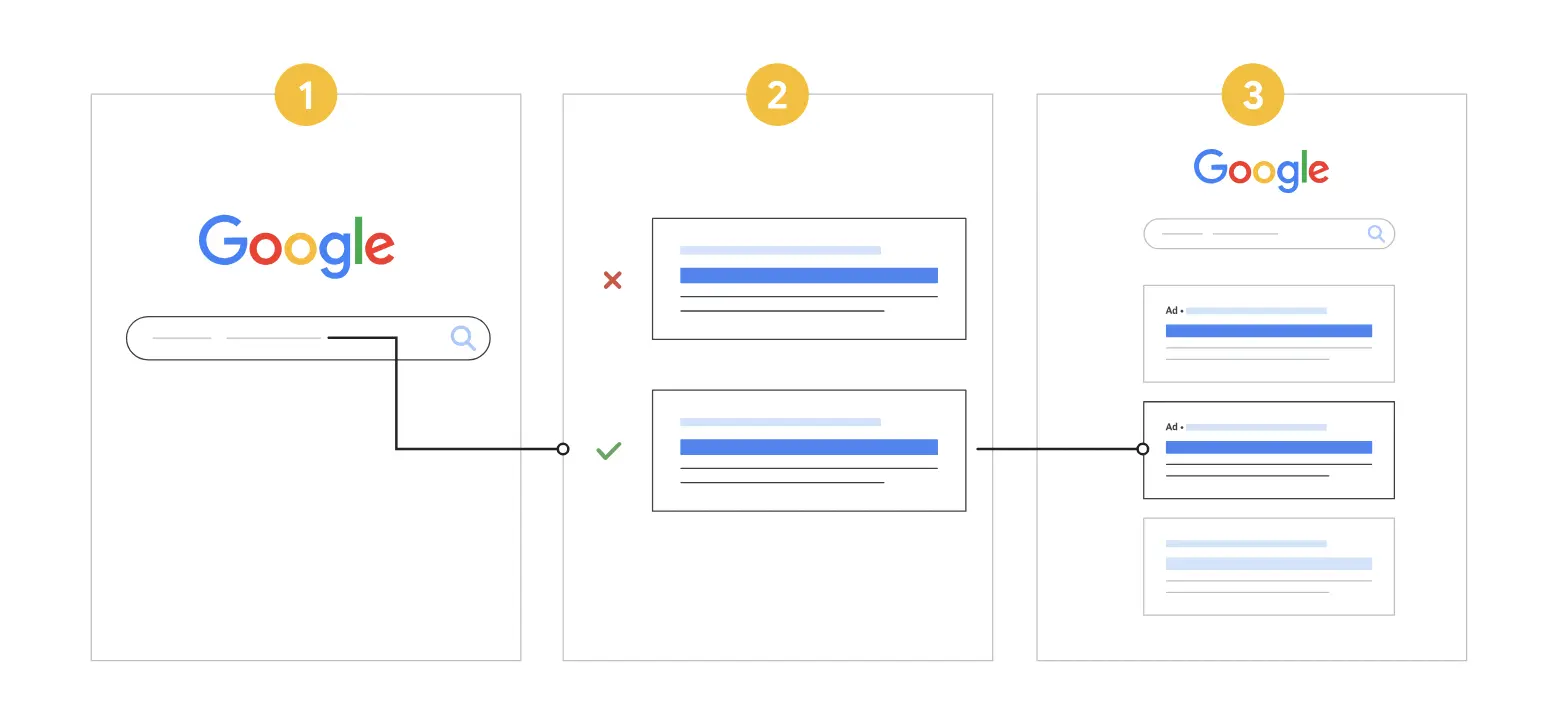
4. The winner is determined
The advertiser with the highest Ad Rank wins the top position. The second-highest gets position 2, and so on. Your bid alone doesn’t determine placement, a well-optimized ad with a strong landing page can outrank a higher bid.
5. Actual CPC is charged
You don’t pay your max bid. You pay just enough to beat the advertiser below you, plus $0.01. This is called your actual CPC, and it’s often lower than your maximum bid.
Paid search vs. organic search
Paid search and organic search both aim to drive traffic from search engines, but they operate on fundamentally different models.
| Aspect | Paid Search | Organic Search |
|---|---|---|
| Cost model | Pay per click | No direct cost per visit |
| Time to results | Immediate | 3–12+ months |
| Placement | Top and bottom of SERPs, labeled “Sponsored.” | Below paid ads in the main results |
| Targeting control | Precise (keywords, location, device, audience) | Limited (content relevance only) |
| Scalability | Scale instantly with budget | Scales gradually as authority builds |
When to use each paid search vs. SEO
Paid search is best when you need immediate visibility, want to test messaging or offers quickly, or are competing in highly commercial spaces where organic rankings are difficult to achieve.
Organic search (SEO) is best for building sustainable long-term traffic, establishing authority in your space, and capturing informational queries where paid ads perform poorly.
The most effective strategies use both. Paid search captures demand today while SEO builds compounding traffic. Running paid campaigns also gives you data on which keywords and messaging convert, insights you can use to inform your organic content strategy.
For advertisers looking to expand beyond search, display advertising offers additional reach across websites and apps, though with different intent signals than search-based campaigns.
Types of paid search ads (with real-world examples)
1. Responsive Search Ads (RSAs)
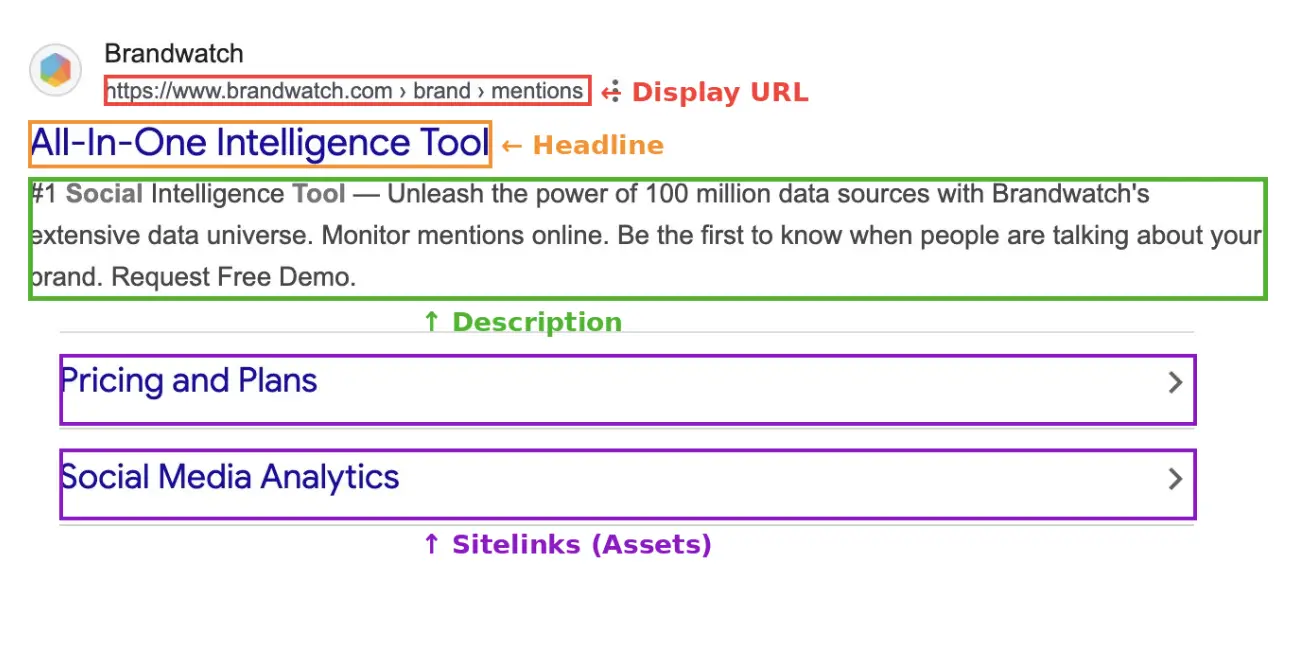
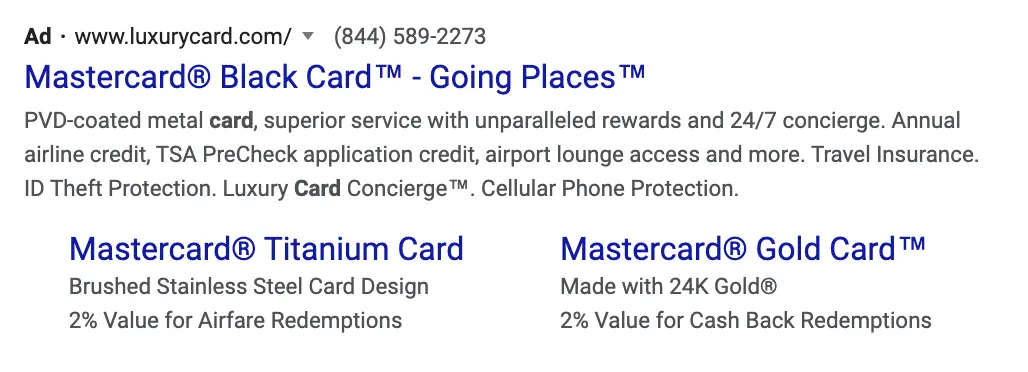
RSAs are the default Google Ads format for paid search campaigns. You provide up to 15 headlines and 4 descriptions; Google’s machine learning tests combinations and serves the highest-performing variation for each query and user context. The ad consists of:
Display URL: Shows your domain and up to two customizable path fields (e.g., yourdomain.com/product/free-trial).
Descriptions: Supporting copy where you communicate your value proposition, benefits, and call to action.
Assets (formerly extensions): Additional information that expands your ad at no extra cost per click.
Common asset types include:
- Sitelinks: Links to specific pages like pricing, features, or case studies
- Callouts: Short phrases highlighting benefits like “Free shipping” or “24/7 support”
- Structured snippets: Lists of product categories, services, or features
- Call assets: A phone number displayed directly in the ad
- Lead form assets: Capture leads directly from the SERP without the user leaving Google
💡Pro tip: Building a dedicated landing page for each ad group doesn’t have to mean starting from a blank canvas every time. Instapage’s drag-and-drop landing page builder and library of conversion-tested templates let you go from ad group to live page in minutes — not days. No developer required.
2. Dynamic Search Ads (DSAs)
Instead of keyword bids, DSAs use your website content to automatically generate headlines and target relevant paid search queries. Google crawls your site, identifies relevant pages, and creates ads dynamically based on what it finds. The ads are excellent at capturing long-tail paid search queries you haven’t explicitly bid on.
The ad headline is auto-generated from your page content; you write the description lines.
3. Performance Max (PMax)
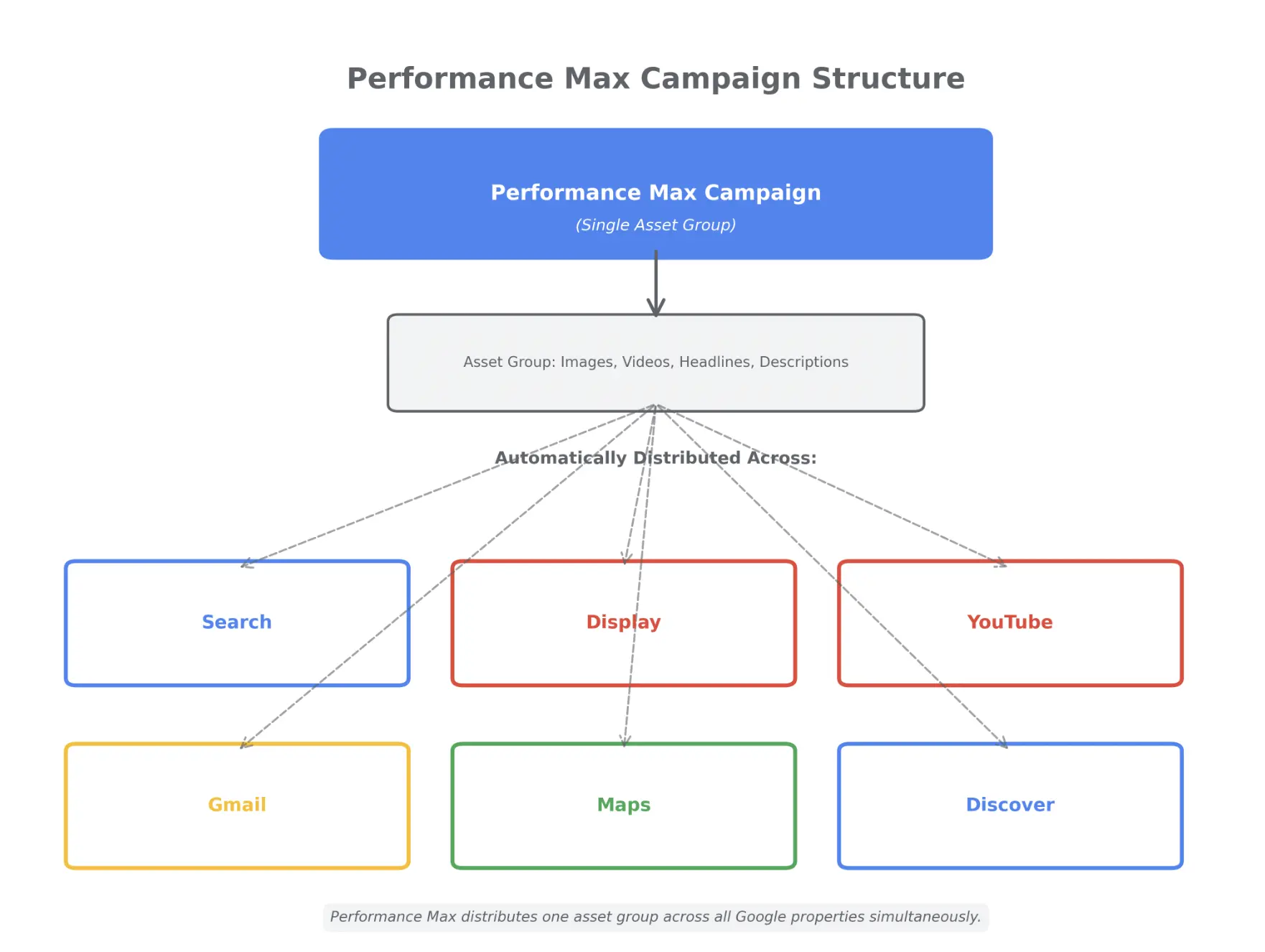
Performance Max is Google’s fully automated campaign type that serves ads across Search, Display, YouTube, Gmail, Maps, and Discover, all from a single campaign. You provide creative assets and audience signals; Google’s AI optimizes delivery across all surfaces in real time.
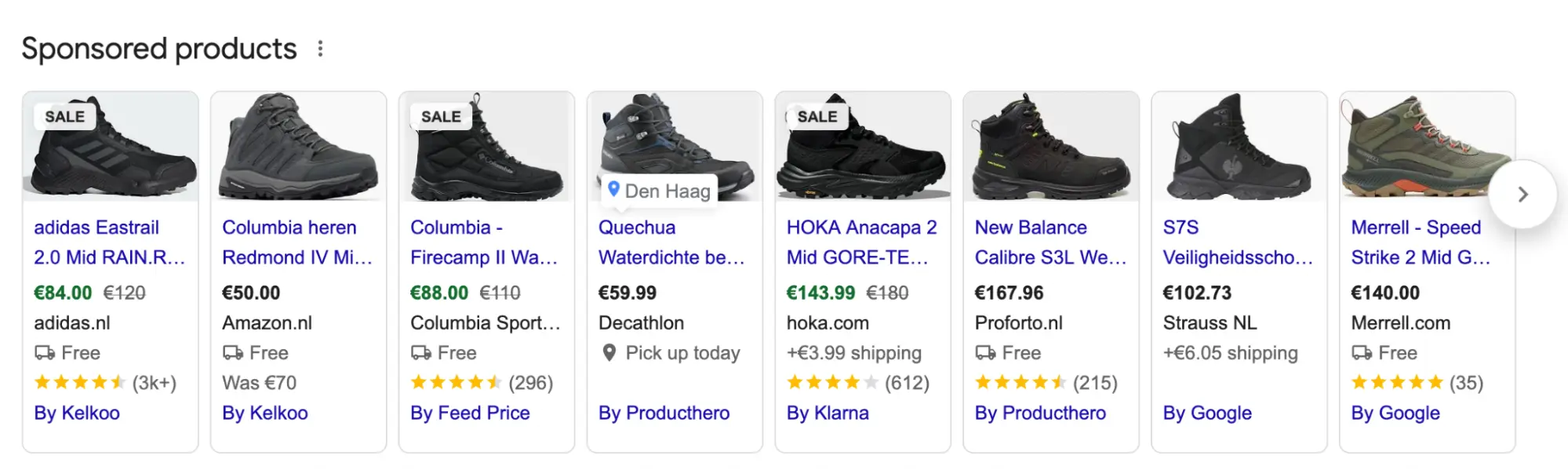
4. Shopping Ads
Product listing ads appear in the Shopping tab and at the top of Google SERPs for commercial product searches. They display a product image, title, price, and store name, no written ad copy needed.
The ads are driven by product feed data in Google Merchant Center, not keyword bids. You optimize Shopping ads through feed quality, product titles, and descriptions, not traditional paid search ad copy.
5. Apple Search Ads
Apple Search Ads appear at the top of App Store search results on iPhone and iPad, making them the most direct paid search format for app discovery.
There are two tiers of Apple Search Ads Basic (minimal setup, Apple generates ads from your App Store listing automatically) and Apple Search Ads Advanced (full creative and keyword targeting control, including custom product pages and audience segmentation).
6. Microsoft Ads (Bing Paid Search)
Microsoft Ads reaches users on Bing, Yahoo, AOL, and partner network sites. The paid search ad format is nearly identical to Google’s RSAs, meaning campaigns can be imported directly from Google Ads and adapted quickly.
Benefits of paid search marketing
1. Immediate visibility
Organic search takes months to build. Paid search puts you at the top of the SERP the day your campaign launches. If you’re entering a new market, launching a product, or responding to a competitor, paid search delivers results now.
2. Targeted, high-intent traffic
Paid search lets you target users based on the exact words they type into a search engine. Someone searching “buy CRM software” is further down the funnel than someone searching “what is CRM.” You can bid aggressively on high-intent queries and spend less on informational searches.
You also control targeting by location, device, time of day, and audience segments, precision that organic search can’t match.
3. Scalable and flexible
Increase your budget, and you increase your traffic. Pause campaigns instantly if needed. Adjust bids in real time based on performance. Paid search scales up and down with your business needs.
4. Measurable and attributable
Paid search platforms provide detailed data on impressions, clicks, conversions, and cost per acquisition. With proper conversion tracking, you can attribute revenue directly to ad spend and calculate return on ad spend (ROAS) down to the keyword level.
This level of measurement makes it easy to justify budgets and optimize toward profitability.
5. Cost control
You set daily budgets and maximum cost-per-click bids. You’re never forced to spend more than you’re comfortable with. And because you only pay when someone clicks, you’re paying for engaged traffic, not just eyeballs.
6. Compounds when paired with optimized landing pages
All of these benefits multiply when your paid search ads connect to dedicated landing pages designed for conversion. A high-intent searcher clicking a relevant ad expects to land on a page that matches the promise. When that match happens, conversion rates improve, cost per acquisition drops, and your ad spend goes further.
Generic homepages with navigation menus and competing CTAs dilute intent. Dedicated landing pages with message match and a singular focus turn clicks into customers.
How to run a paid search campaign
Running a paid search campaign successfully requires a structured setup and ongoing optimization. Here’s the step-by-step process:
Step 1: Define campaign goals
Start by clarifying what you want to achieve. Common goals include:
- Awareness: Drive traffic and impressions to a new product or brand
- Lead generation: Capture contact information for sales follow-up
- Sales/revenue: Drive direct purchases or sign-ups
- App installs: Get users to download your mobile app
Your goal determines your bidding strategy, keyword selection, and how you measure success.
Step 2: Research keywords and match types
Use tools like Google Keyword Planner, SEMrush, or Ahrefs to identify the keywords your audience is searching for. Segment them by intent:
- Informational: “what is project management software?” (top of funnel)
- Commercial: “best project management software for teams” (mid-funnel)
- Transactional: “buy project management software” (bottom of funnel)
Choose match types that strike the right balance between reach and relevance:
- Exact match: Your ads may appear on searches with the same meaning or intent as your keyword. Among the three match types, exact match gives you the most control over who sees your ads, but it reaches fewer searches than phrase and broad match.
- Phrase match: Your ads may show on searches that include the meaning of your keyword. That meaning can be implied, and search queries may be a more specific variation of the keyword’s intent.
- Broad match: Your ads may appear on searches related to your keyword, including searches that may not contain the exact or direct meaning of the keyword.
Start narrow with exact and phrase match. Expand to broad match only after you’ve built a strong negative keyword list.
Step 3: Structure campaigns and ad groups
Organize your account logically:
- Campaigns group keywords by theme, budget, or goal (e.g., “Brand Campaign,” “Competitor Campaign,” “Product Features Campaign”)
- Ad groups within each campaign group are tightly related to keywords (e.g., “free trial keywords,” “pricing keywords”)
The tighter your ad groups, the more relevant your ads can be to each search query.
Step 4: Write Responsive Search Ads
Create RSAs for each ad group:
- Write 10-15 headlines covering different angles: keyword-focused, benefit-led, social proof, urgency, objection-handling
- Write 3-4 descriptions that reinforce value and include a clear call to action
- Pin essential elements (like your brand name or legal disclaimers) to specific positions if needed
Add all relevant assets: sitelinks, callouts, structured snippets. The more complete your ad, the more real estate you own on the SERP.
Step 5: Set bidding strategy and budget
For new campaigns, start with Manual CPC or Maximize Clicks to gather data. Once you have 30-50 conversions per month, switch to a Smart Bidding strategy like Target CPA or Target ROAS.
Set a daily budget you can sustain for at least 90 days. Paid search campaigns need time to gather data and optimize.
Step 6: Build dedicated landing pages
This is where most paid search campaigns fail. Sending paid traffic to your homepage wastes budget. Homepages serve multiple audiences and have navigation menus that pull visitors away from converting.
Dedicated landing pages built specifically for each campaign or ad group convert better because they:
- Match the headline and messaging from your ad (message match)
- Remove navigation and distractions
- Focus on a single conversion goal
- Load faster (improving both Quality Score and conversion rate)
The performance difference can be significant. Industry benchmarks suggest that generic pages often convert at 2-4%, while dedicated landing pages can achieve conversion rates of 10-15% or higher when properly optimized, though results vary by industry, offer, and traffic quality.
Step 7: Set up conversion tracking
Install the Google tag on your site and define conversions: form submissions, purchases, phone calls, app installs.
Connect Google Ads to Google Analytics 4 so you can see the full user journey and attribute conversions accurately. GA4’s “Paid Search” channel grouping automatically tracks sessions from your ads.
Without conversion tracking, you’re flying blind. You can see clicks, but you can’t see which clicks turned into customers.
Step 8: Launch and monitor
Launch your campaign and monitor daily for the first week:
- Check that ads are serving and not disapproved
- Review search terms to identify irrelevant queries, add them as negative keywords
- Watch Quality Score by keyword, address “Below Average” flags on landing page experience first
- Track cost per click and conversion rate against your targets
Paid search rewards active management. Set a weekly optimization routine: review performance, test new ad copy, refine targeting, and expand your negative keyword list.
How to create a high-converting paid search strategy
Build dedicated landing pages for each campaign
Your homepage serves every type of visitor, prospects at every stage, existing customers, partners, and job applicants. It has full navigation, multiple competing CTAs, and no singular conversion focus. A paid search visitor arrived with a specific, declared intent. A generic homepage disperses that intent and sends conversion rates to the floor.
A searcher who clicked “Landing Page Builder for PPC Ads” expects to land somewhere that speaks directly to that need, not a homepage with 12 navigation options and a hero section about company values.
Establish message mismatch between ad and landing page
If your paid search ad says “Free 14-Day Trial—No Credit Card Required” but your landing page headline says “The Platform Built for High-Growth Teams,” visitors register a disconnect, even subconsciously. Research consistently shows that even minor headline mismatches between ad and landing page increase bounce rates and reduce paid search conversion rates.
The rule: ad headline → landing page headline → CTA should tell one continuous, coherent story. The searcher should feel like they arrived exactly where they expected to.
Optimize page speed for mobile users
Research shows that a 1-second delay in mobile page load time can reduce conversions by up to 20%. If you’re paying $5 per click on a competitive paid search keyword and your landing page takes 4 seconds to load on mobile, a meaningful share of your ad budget evaporates before a single visitor has read your headline.
Segment landing pages by audience
A paid search campaign targeting small businesses, enterprise teams, and marketing agencies all driving to the same landing page is serving everyone and compelling no one. Each segment has different pain points, different buying triggers, and different vocabulary. Each deserves a landing page written specifically for them.
💡 Pro tip: Instapage Personalization lets you serve different headlines, CTAs, and social proof to different visitor profiles from a single page, enabling you to match every segment without building separate pages from scratch.
Remove navigation from landing pages
Every navigation link is an exit ramp away from your conversion goal. A dedicated paid search landing page removes distractions and keeps visitors focused on exactly one action. Navigation menus belong on your website. They don’t belong on pages receiving paid search traffic.
Build landing pages that match your ads — start your 14-day trial
How to measure paid search performance
Measuring paid search correctly means mapping the right metrics to your goals. Here’s how to track what matters:
Goal-to-KPI mapping
| Goal | Key Metrics to Track |
|---|---|
| Awareness | Impressions, Reach, Search Impression Share |
| Consideration | Click-through rate (CTR), Cost per click (CPC), Quality Score |
| Conversion | Conversion rate, Cost per acquisition (CPA), Return on ad spend (ROAS) |
| Efficiency | Wasted spend %, Search Impression Share Lost (Budget), Search Impression Share Lost (Rank) |
Why is conversion rate the highest-leverage metric
The average cost per lead has increased from $66.69 in 2024 to roughly $70.11 in 2025. CPCs are rising across most industries. The most cost-effective way to control your CPA isn’t to bid less or cut budget, it’s to improve your conversion rate.
Improving the conversion rate from 3% to 6% halves your CPA without changing your ad spend.
💡 Pro tip: Your landing page controls conversion rate, not your ad platform. Instapage Experimentation lets you test headlines, CTAs, and layouts against live paid search traffic to find what drives ROI.
Track landing page metrics alongside your ad metrics:
- Bounce rate
- Time on page
- Pages per session
- Scroll depth
- Form abandonment rate
Turn paid search clicks into conversions
Paid search advertising puts your brand in front of high-intent buyers at the exact moment they’re searching. With $355.10 billion in global spend forecasted for 2025, it remains the largest digital advertising channel by revenue.
But clicks alone don’t drive revenue. The post-click experience, what happens after someone lands on your page, determines whether your paid search investment pays off.
The auction rewards relevance. Quality Score includes landing page experience as a core component, meaning the quality of your landing pages directly affects your cost per click and ad position. And on the conversion side, a dedicated, message-matched landing page can double or triple your conversion rate compared to a generic homepage.
Instapage helps marketing teams build, personalize, test, and scale landing pages for every paid search campaign, without relying on developers. From drag-and-drop page building to AI-powered content generation to A/B testing against live traffic, Instapage is built for the post-click stage that most paid search guides ignore.
Start your free 14-day trial and see how dedicated landing pages turn paid search clicks into conversions.
Frequently Asked Questions
What is the difference between paid search and PPC?
PPC (pay-per-click) is the pricing model. Paid search is the channel. All paid search ads use PPC pricing, but PPC also applies to social media ads (Facebook, LinkedIn) and display ads. When someone says “PPC,” they often mean paid search specifically, but technically, PPC is broader.
How much does paid search advertising cost?
Costs vary widely by industry, keyword competition, and Quality Score. CPCs can range from under $1 for low-competition keywords to $50+ for highly competitive industries like legal, insurance, and finance.
You control costs through daily budgets and max CPC bids. The most effective way to lower your cost per acquisition is to improve your Quality Score and landing page conversion rate — not to bid less.
What is paid search traffic in Google Analytics?
In Google Analytics 4, “Paid Search” is a default channel group that captures sessions arriving via paid ads on search engines like Google, Bing, or Yahoo. GA4 automatically categorizes this traffic based on UTM parameters or Google Ads auto-tagging.
You can view Paid Search traffic under Reports > Acquisition > Traffic Acquisition, filtered to the “Paid Search” channel.
Is paid search better than SEO?
Neither is inherently better—they serve different purposes. Paid search delivers immediate visibility and precise targeting but requires ongoing spend. SEO builds compounding organic traffic over time but takes months to show results.
The most effective digital marketing strategies use both. Paid search captures demand today while SEO builds long-term authority.
Why are my paid search ads getting clicks but not conversions?
Common causes include:
- Poor message match between ad and landing page: the headline you promised in the ad doesn’t appear on the page
- Slow page load times: users abandon before the page finishes loading
- Generic landing pages: sending traffic to a homepage with navigation and competing CTAs dilutes intent
- Weak or unclear call to action: visitors don’t know what step to take next
- Form friction: asking for too much information too soon
Related reading:
- What is a landing page?
- How to increase click-through rate (CTR)
- Display advertising: what it is and how it works
- Bing Ads vs. Google Ads: which is right for your business?
- Quality Score: what it is and how to improve it
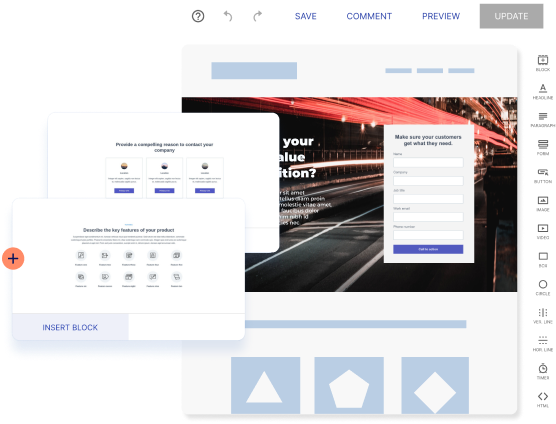
Try the world's most advanced landing page platform with a risk-free trial.
